
School CRM
School CRM —
from first enquiry to enrolment
Every course enquiry, trial lesson and conversation with a parent or student goes into a single process. Your team sees each contact's current stage, who is responsible, the activity history and the next step. With tasks and reminders, no enquiry goes unanswered and no enrolment gets lost between phone calls, forms and messages.
14-day free trial · no credit card · full access to every feature
7 stages
in the pipeline from enquiry to enrolment
€29.99
per month / location
14 days
free trial, no credit card
What is a school CRM?
A school CRM is a system for managing contacts with people interested in your courses, together with enquiries, enrolment forms, tasks, trial lessons and the whole student recruitment process.
In eSkul all of this is connected to your courses, groups, timetable, contracts, payments and communication. That means a contact doesn't stop at a form - it can move smoothly into a course enrolment.
A CRM for every kind of school
eSkul works for language schools, music schools, dance schools, sports academies, tutoring centres and other private education providers. In each case it organises contacts, enrolments, tasks, communication and ongoing student support.
A school CRM instead of spreadsheets and scattered messages
Enquiries arrive through forms, phone calls, email and social media. In a spreadsheet it is easy to lose the contact history, a call-back date or the outcome of a trial lesson. eSkul CRM brings all of this into one process - you can see who got in touch, what they are interested in, who is responsible and what the next step should be.
Unanswered enquiries
An enquiry sits in the inbox until someone happens to notice it.
No record of the next contact
Nobody knows who was supposed to call the candidate back, or when.
Enquiries spread across inboxes
Email, phone, forms and social media - every channel on its own.
No conversation history
The next person on the team has no idea what was already agreed with the candidate.
No overview of trial lessons
It is unclear which lessons took place and how they went.
Accepted but never enrolled
The candidate has chosen a course, but the enrolment still has not been created.
Not a contact list. A decision cockpit.
A CRM that shows what needs action right now
The CRM module takes your school from the first course enquiry, through the trial lesson, all the way to enrolment and re-enrolment for the next term. Instead of scrolling through records, your team immediately sees which enquiries, tasks and trial lessons need a response - and each tab is built for getting a specific job done.
Needs action
The items that move your recruitment forward.
6 new enquiries waiting for first contact
The oldest enquiry has been waiting for 2 days
5 overdue tasks
3 are follow-ups after a trial lesson Needs a response
2 trial lessons today
1 held yesterday with no outcome recorded
3 accepted contacts not yet enrolled
Waiting for a course enrolment to be created
Needs action - your student recruitment cockpit
See what needs action in your recruitment process right now
Instead of browsing the whole contact database, your team immediately sees what actually moves the process forward: new enquiries without a first contact, today's and overdue tasks, trial lessons today and in the coming days, and accepted contacts still waiting for an enrolment. A simple pipeline - from enquiry, through the trial lesson, to the decision and enrolment - shows how many contacts are at each step.
Contacts - your database of candidates and students
Every prospective student in one place
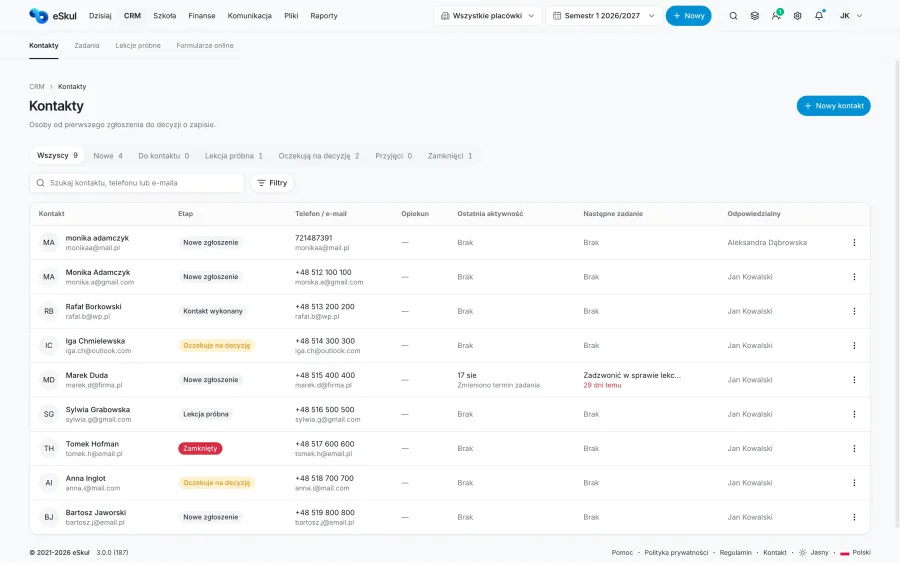
Contacts is the central list of every candidate, parent, adult student and company involved in the enquiry process. Each record has a pipeline stage, an owner, the enquiry source, course interest, contact history and the next task and trial lesson - it is your CRM team's main workspace, and one click takes you to a course enrolment.
Contacts
9 activePeople and organisations taking part in the enquiry process.
Emma Clarke
“Enrolment” form · 2 days ago No contact scheduled
Tom Harris
German A2 · owner: James Walker
Sophie Turner
Trial lesson: yesterday, 5:00 PM Outcome: positive
Tasks - keep track of your team's follow-ups
Know exactly who to contact today
Tasks are the calls, emails, follow-ups and decisions your team needs to handle. The Today, Upcoming, Overdue, No due date and My tasks views let everyone work from their own list, while the owner keeps an eye on the whole team's workload. Every task links straight to the contact and makes the next step clear, so no enquiry goes unanswered.
Tasks
3 todayContacts and actions your team needs to follow up on.
Call about the trial lesson
Daniel Reed · Today, 3:00 PM
Send the German A2 course offer
Tom Harris · due: yesterday
Ask for a decision after the trial lesson
Sophie Turner · Tomorrow, 10:00 AM
Trial lessons - from interest to decision
Dates, attendees and decisions after trial lessons
The Trial lessons module covers the whole cycle: scheduling the date, teacher, room and class format, confirming, rescheduling or cancelling, and after the class - marking the lesson as held and recording the outcome. Lessons that have already taken place but have no outcome recorded need special attention, so eSkul clearly flags them and no candidate's decision is left hanging.
Trial lessons
1 without outcomeDates, attendees and decisions after trial lessons.
Today, 5:00 PM · German A2
Tom Harris
Teacher: Oliver Grant
Yesterday, 5:00 PM · Spanish B1
Sophie Turner
Held
Tomorrow, 11:00 AM · Korean A1
New candidate
“Enrolment” form
Online forms - enrolments straight from your school website
Enrolments start on your website
In the Online forms tab you build the form fields and steps, publish it and share the link or embed it on your school website. Every submission maps straight into the CRM - it automatically creates or updates a contact and can instantly create a task for your team. The form is part of the same process as the CRM, not a separate system alongside it.
Online forms
+ New formForms that collect new enquiries for your school.
“Course enrolment” form
Publishedeskul.cloud/f/course-enrolment
12 submissions this month · 2 unread
“General enquiry” form
Publishedeskul.cloud/f/contact
5 submissions this month
A CRM for student recruitment
Guide candidates through the whole recruitment process - from the first enquiry, through contact and a trial lesson, to course enrolment. Every contact has a current status, an owner, your team's activity history and a scheduled next step.
A school CRM system that connects recruitment with day-to-day work
eSkul brings together your contact database, enrolment forms, tasks, trial lessons, groups, payments and communication. Your school doesn't need separate tools for candidates and students - school CRM software and enrolment management work as one consistent student recruitment system.
What does eSkul CRM replace?
Your front office and admissions team get one process instead of several scattered tools.
| Without a CRM | With eSkul CRM |
|---|---|
| Enquiries in several places | All contacts in one database |
| Retyping form submissions by hand | Submissions go straight into the CRM |
| Tasks in private notes | Tasks and deadlines for the whole team |
| Trial lessons in a separate calendar | Trial lessons linked to the contact |
| No record of the next step | Every contact has a current stage |
| Handing over students by hand | From contact to enrolment inside the system |
How is a school CRM different from a regular CRM?
A regular CRM stores contacts and sales opportunities. A school CRM also has to handle courses, groups, trial lessons, the timetable, teachers, contracts, payments and communication with students.
In eSkul a contact doesn't disappear from the CRM after enrolment. It moves into the same system where your school runs its classes, payments, documents and communication with students.
Five-step process
From enquiry to enrolment in five steps
Form or phone call
A candidate gets in touch through a form, by phone or by email.
Contact created automatically
The enquiry goes straight into the CRM contact database.
A task for the front office
The team knows who should contact the candidate, and when.
Trial lesson and outcome
After the class, the outcome is saved straight to the contact.
Course enrolment
The student is added to a group, the timetable and payments - with no retyping.
You can support the whole process with task and workflow automation, and track how well your recruitment is working in the Reports module.
Start risk-free
See how many enquiries stop getting lost in your inbox
Create an account and see what your recruitment process looks like when contacts, tasks, trial lessons and forms are all in one place. No credit card needed, and the basic setup takes just a few minutes.
eSkul Plan
Full access to every feature in eSkul.
Frequently asked questions
Is eSkul CRM right for your school?
Straight answers about the recruitment process, forms and the cost of the eSkul CRM.
What is the CRM module in eSkul?+
The CRM is the cockpit for your student recruitment process. It shows what needs your team's attention right now: new enquiries, tasks, trial lessons and contacts waiting for a decision or enrolment - from the first sign of interest to signing up for a course.
What does the process from enquiry to enrolment look like in eSkul CRM?+
Every contact moves through a simple pipeline: New, To contact, Contacted, Trial lesson, Awaiting decision, Accepted, Closed. At every stage you can see who is responsible, the activity history and the next step, so no enquiry is ever left unattended.
Can I collect enquiries through a form on my school's website?+
Yes. In the Online forms module you build an enquiry form, publish it under its own link and embed it on your school website. Every submission automatically creates or updates a contact in the CRM, with no manual data entry.
What happens to a contact after a trial lesson?+
The trial lesson is part of the same process as the CRM. After the class you mark the lesson as completed and record the outcome - the contact moves to the “Awaiting decision” stage and from there straight to creating a course enrolment, without switching between systems.
How much does the eSkul CRM cost?+
The CRM is part of the full eSkul system for €29.99 (US$29.99) per month per location, with no limit on contacts, tasks or forms. You can try every feature free for 14 days, without a credit card.
Stop losing student enquiries.
Start with a free trial or talk to us about setting up the CRM at your school.