
School management software, from classes to payments and communication
One system that automates your school's administration.Save time. Cut costs. Grow your school without limits.
14 days free.
No credit card required.
Start every day with a clear plan.
Priorities, upcoming classes and tasks on a single screen.
Every school process in one place.
Meet 8 dedicated modules that replace a dozen separate tools and spreadsheets.
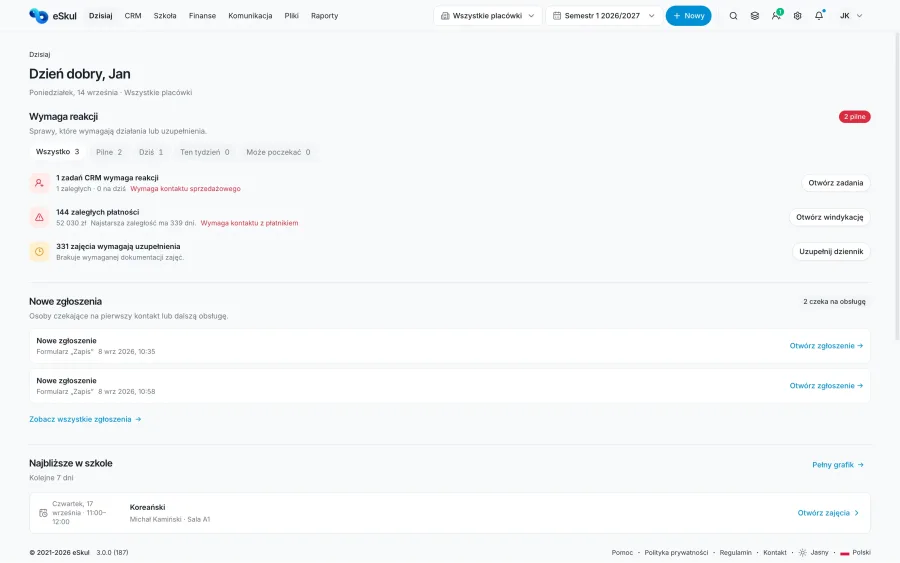
Today - everything that needs your attention
No more hunting through tabs after you log in. The Today module brings new enquiries, overdue payments, missing register entries, timetable changes and upcoming classes into a single view. Owners, front-office staff and teachers instantly see what needs a response and can jump to the right item in one click.
- Urgent matters and tasks in one view
- A quick picture of attendance, payments and classes
- The next step always at hand
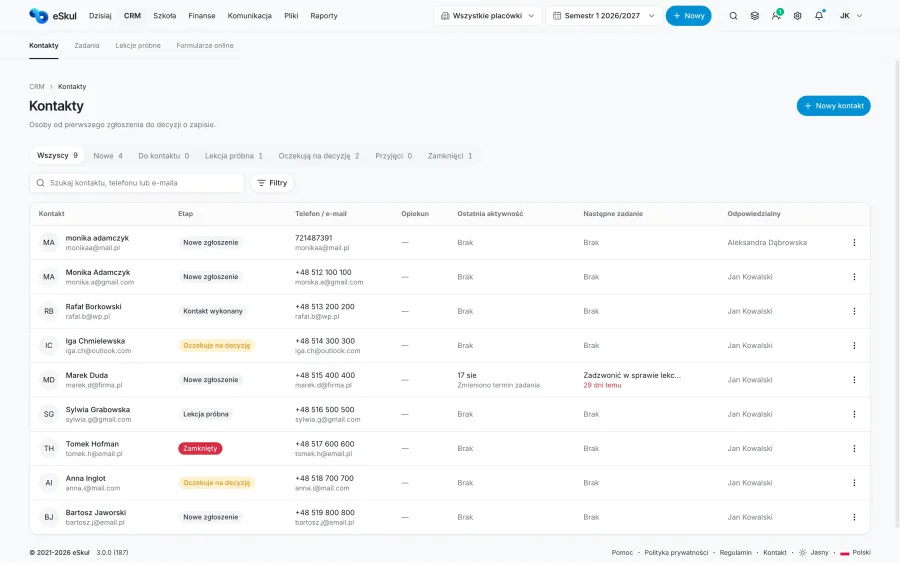
School CRM - from first contact to enrolment
Every course enquiry, trial lesson and conversation with a parent or student goes into a single process. Your team sees each contact's current stage, who is responsible, the activity history and the next step. With tasks and reminders, no enquiry goes unanswered and no enrolment gets lost between phone calls, forms and messages.
- Stages for enquiries, trial lessons and enrolments
- Full contact history and tasks for your team
- Reminders so that no enquiry goes unanswered
A clash-free timetable - groups, rooms and teachers under control
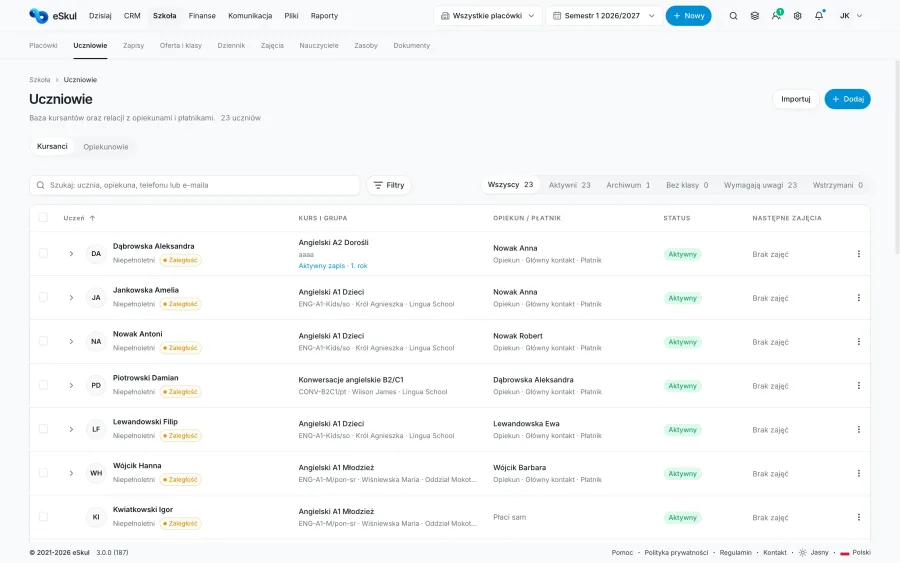
Build schedules for group and one-to-one classes, assign teachers, rooms and resources, and check their availability instantly. eSkul helps you avoid timetable clashes, and when plans change it keeps cover lessons, rescheduling and make-up classes in order. The timetable stays linked to your students, attendance and the day-to-day running of your school.
- Group and one-to-one classes in one planner
- Teacher, room and student availability in one view
- Changes, cover lessons and make-up classes without the chaos
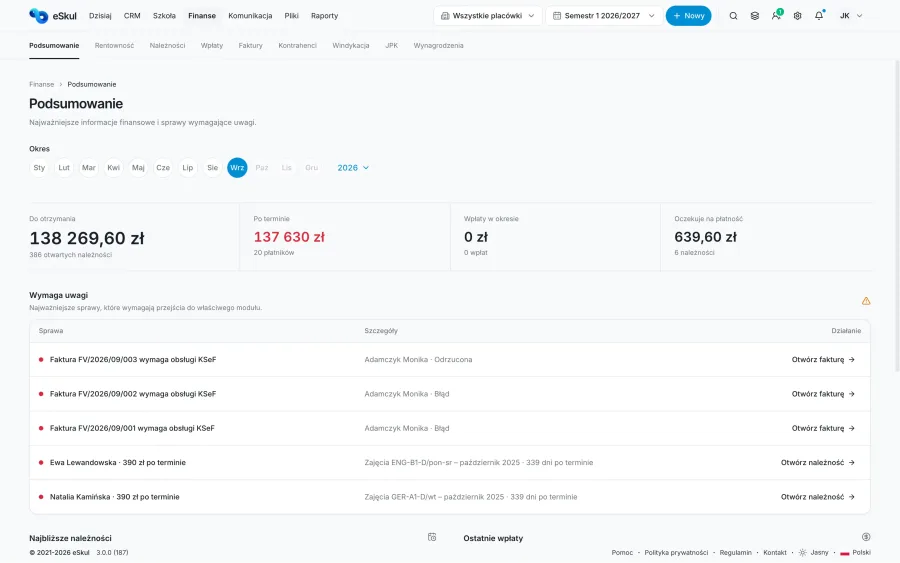
Payments and invoices - without checking every transfer by hand
No more checking bank statements by hand. The system automatically matches BLIK and bank transfer payments to student accounts, issues invoices and sends friendly reminders about overdue fees.
- Fees, payments and invoices linked to the right student
- Payment reminders and overdue fee tracking
- An up-to-date picture of finances for the school and each location
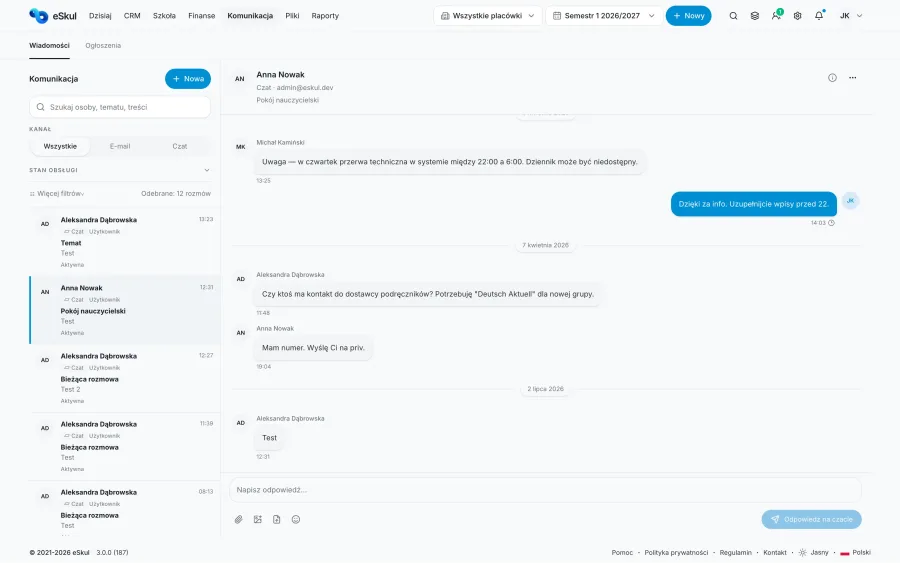
Messages to parents, students and staff
Announce class changes, cancelled lessons, payments and other important news without looking up contact details in several places. eSkul lets you send messages to the right group, student, parent or teacher, and the full communication history stays with that person and matter.
- Email, SMS and announcements to selected recipients
- Templates for recurring situations at your school
- Correspondence history for every student, parent and group
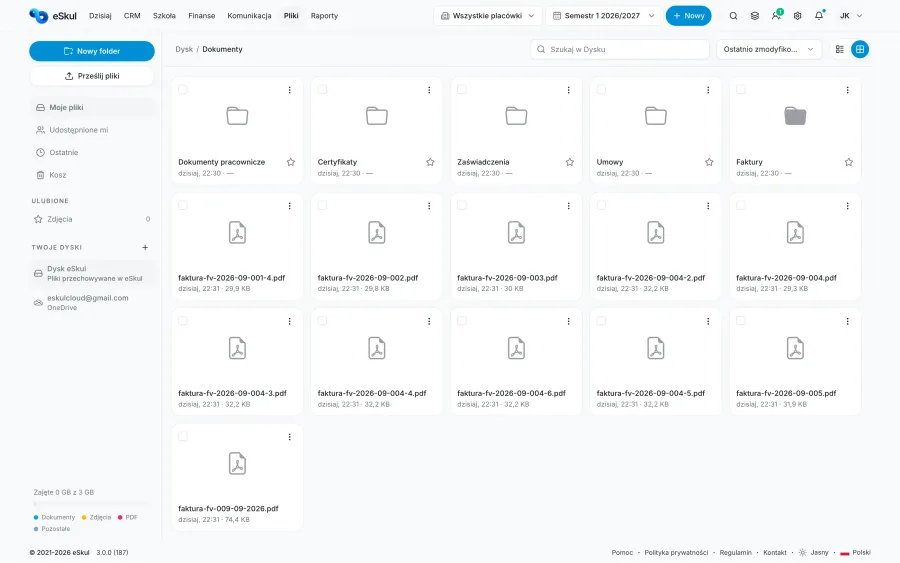
A shared school drive - files, folders and access under control
One place for teaching materials, contracts, policies, invoices and staff documents. Create folders just like in a familiar cloud drive, organise files by school, location or course, and share them with the right people without sending attachments.
- Folders and files organised around your school's structure
- Access for roles, specific users or via a controlled link
- Materials linked to a student, group, course or staff member
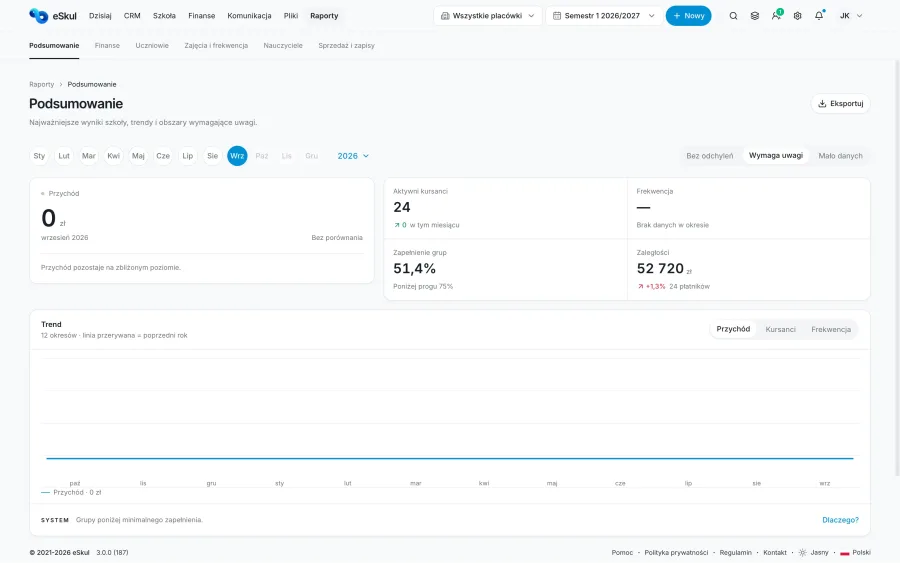
School reports - see what works and what needs a decision
Track attendance, enrolments, payments and course and group performance without stitching together data from several spreadsheets. eSkul gathers information from your school's daily work and presents it in clear reports. Compare periods, courses and locations to react faster to falling attendance, drop-outs or overdue payments.
- Attendance, enrolments, fees and payments in one view
- Performance of courses, groups and locations
- Export reports to Excel and PDF
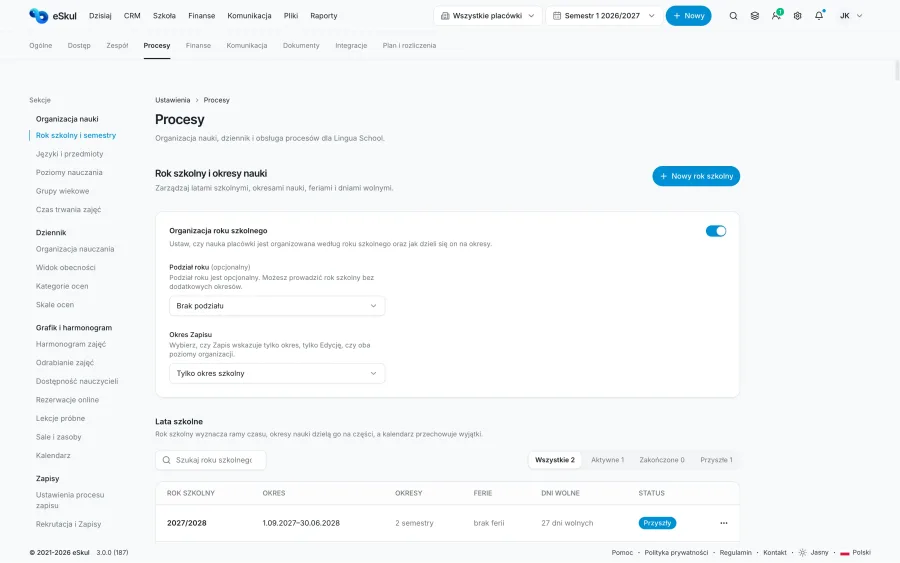
School and location settings - structure that grows with you
Configure how your school works: locations, rooms, terms, users, roles and permissions. When you open another location you keep a shared structure while managing its own resources, team and settings. Everything stays in one system, no matter how many places you teach in.
- Multiple locations and local settings in one account
- Roles and permissions for owners, front-office staff and teachers
- Rooms, resources, school details and organisational settings under control
Everyone sees exactly what they need to do their job
Owners, the front office, teachers, students and parents each work in eSkul in a view designed for them. You decide who can access which data, modules and locations - without opening up the whole system to everyone.

Owner / Head of school
See the whole school at a glance: today's priorities, enrolments, payments, classes and how each location is performing. Make decisions based on up-to-date data without asking your team for every report.

Front office / Administration
Handle enrolments, students, groups, the timetable, documents and day-to-day communication. See the tasks that need action and the full contact history, so nothing gets lost between phone calls, emails and spreadsheets.

Teacher / Tutor
Your own timetable, class lists, attendance, register and teaching materials are always at hand. You see what relates to your work - without access to school data you don't need.

Student / Learner
Check your timetable, changes, attendance, materials and important announcements from the school. Everything related to your learning is in one simple view.

Parent / Guardian
See your child's timetable, messages from the school, attendance and anything that needs your attention. Stay on top of classes and payments without having to call the school office.

Roles tailored to your school
Need separate access for your accountant, a location manager or a class coordinator? Create your own roles and define exactly which modules, data and locations each person can access.
Your school's data under control
Student, parent, teacher and billing data needs special protection. That is why access to eSkul is based on roles and permissions, and important actions are recorded in the activity log. Details about data processing, infrastructure and the providers supporting the service are available in our security documentation.
Role-based access
Everyone only uses the data and modules they need for their work. The school owner manages roles, permissions and access to each location.
Extra login protection
Two-factor authentication helps protect administrator and user accounts from unauthorised access.
Transparent data infrastructure
Our security documentation sets out the infrastructure we use, where data is processed and how backups are stored.
Backups and data recovery
We automatically create encrypted backups in line with the eSkul security policy. Backup frequency, retention period and the recovery procedure are described in our security documentation.
Encryption in transit and at rest
Data sent between your browser and eSkul is protected by an encrypted TLS connection. The scope of encryption at rest, key management and infrastructure safeguards are described in our security documentation.
How much time could your school win back?
Set the number of students, groups and the hourly cost of admin work. We will show an indicative estimate of the time eSkul could help you win back by automating enrolments, timetabling, attendance, payments and communication.
Your details
One simple price.
No student limits. No feature limits.
Every feature for one flat price, with no hidden fees or surprises.
eSkul Plan
Full access to every feature in eSkul.
Got questions? We have answers.
Frequently asked questions about setup, data migration and working with eSkul day to day. Can't find an answer? Get in touch.
You can do the basic setup (locations, roles, class pricing) yourself in about 5 minutes. If you are moving data from Excel or another system, our team helps for free and usually completes the migration within 24 hours.
Yes. The eSkul team migrates your student data, timetable and payment history for free, and your old system can keep running in parallel until the switch is complete - with no downtime for your front office.
Yes. It is one flat price per location with no limit on students, teachers or modules. The only extras are SMS packages and additional storage beyond the default 1 GB.
Nothing happens without your consent - your data stays in the system. If you decide to leave, we permanently delete it or export it in a readable format for you to reuse, whichever you prefer.
Technical support and updates are included in the price. You can reach us by chat or email, and for urgent issues (such as a problem with payments) we reply on the same working day.
Yes. In the settings you can add as many branches and locations as you need, assign rooms, teachers and rates to each, and view reports for the whole network or for each branch separately.
Didn't find the answer you were looking for? Write to our team